


A native Windows editor for Pascal that also builds, debugs, profiles, disassembles — and works with an AI that has to show its work.
Available for FREE from our download portal at: https://portal.components4developers.com
Require login. Takes 20 seconds to make one if you do not already have one.
This release includes Markdown WYSIWYG presentation and print, and export to PDF.
theDANE started as an editor. It is still an editor first: it opens a file you double-clicked, syntax-highlights eleven languages, and does not care whether you have a project, a compiler, or anything else installed. That rule has not moved, and every feature below is written to respect it.
Then somebody asked whether it could set a breakpoint.
Between the tabs and the status bar there is now a project system that drives the real toolchains, a native debugger that reads Delphi’s own symbol format, four kinds of profiler, a disassembler, a control flow graph, a refactoring engine, a metrics engine, a complete scripting language in MIMERCode, and an AI layer wired into all of it. This is roughly what happens when nobody says no for a while, and we regret nothing.
To be plain about the scale of it: version 1.0 was an editor, and a good one.

Everything past the editing surface arrives here for the first time.
The project system, the debugger, all four profilers, the disassembler and the whole binary workbench, refactoring, code metrics, MIMERCode scripting, the AI layer, desktop sessions — none of that existed in a shipped theDANE before this build.
This is not a point release with a changelog. It is the same editor with an entire toolchain grown around it.
This post walks through what is in it, spends most of its length on the AI integration — because that is where the design decisions are least obvious and matter most — and finishes with what theDANE is built to be good at.
One thing to look for on the way past, because it is the feature that decides how all the rest of it feels: personalities, which let you have as much or as little of this as you actually want.
Ninety seconds that explain the whole thing
Take a Delphi executable. Not yours — one you were handed, stripped, no source, no map file, built by someone who has since left. The classic Tuesday.
Drop it on theDANE and choose Analyse Binary. It walks the code, and then it does something a general-purpose tool has no reason to know how to do: it finds the virtual method tables, reads the class structure the Delphi compiler wrote into them, and gives the functions their real names back.
sub_00401A40 becomes TCustomerForm.btnSaveClick.
Not a guess. Not an AI hallucinating something plausible. The names were in the file the whole time, because that is how Delphi builds an executable — and theDANE, being the thing that builds Delphi executables, knows exactly where to
look.
Now right-click a blob of bytes you do not recognise and ask for a parser. What comes back is a MIMERCode script that colours the byte ranges in place and builds a report tree beside them — and it has already been linted and run against your
actual file before you were shown it, because a parser that has not met your bytes is a hypothesis, not a parser.
Find a byte pattern with Find in Files. Disassemble at that address. Name the function. Set a source-level breakpoint on it. Run it under the profiler and watch which line inside it is expensive.
One application. One set of names. No step in the middle where you copy a hex number into a different program and pray.
That is the pitch. The remaining four thousand words are detail.
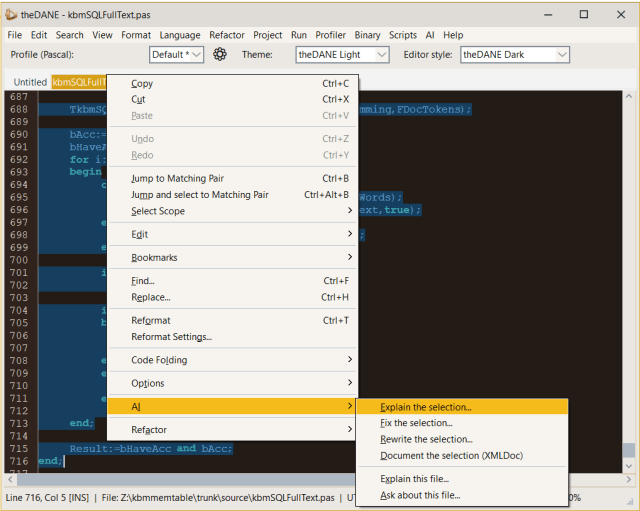
The editor
Everything else stands on the editing surface, so that is where the work went.
- Eleven languages: Pascal/Delphi, SQL, XML, JSON, HTML, JavaScript/TypeScript, C#, CSS, Markdown, Key/Value (INI,
.env, properties) and MIMERCode. - Split editing — two panes, two sets of tabs, two files side by side. A file lives in exactly one pane, so splitting moves a tab rather than cloning it.
- Word wrap, minimap, whitespace rendering, code folding (syntax, indentation, custom regions and manual), numbered and unnumbered bookmarks.
- Multi-caret editing with distribute paste, column selection, smart selection expansion, and the usual line operations.
- Find and replace with regex, a Find All results panel, and Find in Files across a folder — which searches source and binaries: text hits open at a line, binary hits open at a byte offset in the hex view.
- Rich clipboard — copy syntax-coloured code as HTML and RTF as well as plain text.
- Encoding and line endings are explicit: detected on load, shown in the status bar, converted on command. UTF-16 without a BOM is not guessed at, because guessing it wrong turns a text file into nothing.
- Auto-close pairs, opt-in, that wrap a selection rather than replacing it and delete both halves on backspace.
- Compare and merge built in — against the file on disk, another file, or another open tab, with a three-way merge view whose Save writes back.
- A hex editor as a first-class mode, not a plugin: dual pane, a data inspector with 24 formats, find in hex or text, its own undo.
- Desktop sessions — your open files, caret positions, unsaved edits, panel layout, breakpoints and watches, restored when you come back.
Large files were designed for rather than hoped about. Rendering is viewport-only, highlighting is incremental per line, and the line storage promotes a long line to a rope structure and demotes it again when it shrinks — so minified JavaScript on one line and a million-line log are both ordinary.
Understanding code with nothing installed
This is a theme worth naming, because it is unusual.
theDANE carries a lexical profile per language — where comments start, where strings start, what may be in a name, whether case matters. About forty lines of table per language. On top of that sits a declaration scanner that reads a
file and reports what it declares: units, types, routines, members, sections, keys — whatever that language has.
No server. No compiler. No project. No configuration.
That is what makes outline, navigation, renaming, metrics and documentation generation work on a file somebody opened on a machine with no toolchain at all — which is precisely the case every language server is useless in, and precisely the case an editor exists to serve.
Where a language server is available, theDANE uses it and says so.
Projects, building and code intelligence
theDANE opens Delphi .dproj/.groupproj (and a bare .dpr/.dpk) and Lazarus .lpi/.lpk, with a project explorer, new-project templates, and a diagnostics panel whose entries jump to the line.

Builds go through the real toolchains — MSBuild with rsvars and dcc32/dcc64 for Delphi, lazbuild for FreePascal — with the inherited environment scrubbed, so a second RAD Studio installation on the machine cannot poison a build with the
wrong System.dcu. Foreign project files are never regenerated; theDANE’s own state lives in a sidecar beside them.
Code intelligence is a chain of providers rather than a single dependency:
| Provider | Gives |
|---|---|
| DelphiLSP | Type-aware completion and Error Insight for Delphi |
| theDANE’s own Pascal server | The same for FreePascal — compiled on demand from source carried inside the executable, so there is nothing to download or configure |
| FPC itself | FreePascal diagnostics, used as a linter |
| The MIMERCode registry | Completion straight out of the linked signature registry |
| The declaration scanner | Structure for everything else, and for when none of the above is present |
When one cannot answer, the next one does, and when none can, you still get structure. Nothing degrades to nothing.

Refactoring
Rename (F2) across a project, in every language theDANE opens — with the two scopes deliberately kept apart:
- References — a language server answered, so the site list is the uses, and the compiler will confirm the result.
- Textual — nothing could answer, so every whole-word occurrence was found and each one tagged as code, comment or string.
The second is not a weaker version of the first. It is a different promise, and theDANE says which one you have rather than quietly renaming a word inside a string literal because the letters matched.
Every rename previews every site before a character changes, applies as a single transaction, journals itself, and undoes in one step across every file it touched — including files that were never open. Find references (Shift+F12) gives you the same list without acting on it.
Debugging

A native Win32/x64 debug engine, not a wrapper around anything.
- Reads TD32 — Delphi’s own symbol format, which nothing else in the editor world reads — and DWARF for FreePascal and GCC-built binaries.
- Breakpoints from the gutter, persisted between sessions, with conditions.
- Step into/over/out, run to cursor, step one instruction, step into library code, run until return.
- Locals, watches, threads, registers and a CPU view, with hover evaluation in the editor.
- Debug what the project builds, any external binary, or attach to a process already running.
- 32-bit targets under a 64-bit debugger via the WOW64 context, correctly.
And user-written value formatters: a MIMERCode script decides how your type is displayed, so a local reads the way the type means rather than the way it is laid out. The formatter can never read the debuggee’s memory — it returns a rendering, a request for bytes, or a decline, and theDANE does every read and bounds it. “Install this pretty formatter for our internal types” is therefore not an arbitrary-memory-read primitive.

Profiling — four kinds
| Kind | Answers |
|---|---|
| Sampling | Where does the time go? Up to 1000 samples/second, wall-clock and processor cycles side by side, so waiting is distinguishable from computing |
| Exact | What does this named routine cost? Call counts and cycles per call — the question no sampler can ever answer |
| Line coverage | What is never reached at all? |
| Allocation | What is allocated, by whom, and what is never given back? |

Sampling keeps one call tree per thread, because a merged tree over a Delphi application buries the worker under a main thread that samples a million times while sitting in a message loop — and a merged tree can never be taken apart again, since the thread each sample came from is exactly what was thrown away.

Coverage arms a breakpoint per line boundary, records the hit, puts the original byte back, and never arms it again — so a line inside a ten-million-iteration loop costs one debug event, once, and the program runs at full speed thereafter.

What theDANE learns about a program — where its sources were, which routines to measure exactly (by image offset, not address, so ASLR cannot invalidate them), the interval and arguments — is kept in a sidecar beside the executable. The second run of the same program is one click.
Code metrics
Cyclomatic and cognitive complexity, nesting, SLOC, tokens, Halstead, ABC and the maintainability index — per routine and per file, for all eleven languages, computed from the lexical map rather than a syntax tree.
For Pascal projects there is a unit-level view too: afferent and efferent coupling, instability, abstractness, distance from the main sequence, and circular unit references listed as the loop they form. On most days that view is worth more than the per-routine numbers. A high complexity score tells you a routine is knotty; a cycle between four units tells you why nothing in the project can be moved.

Binary analysis and reverse engineering
This is the half of theDANE that has no counterpart in any other editor. It is a binary workbench, and it runs in the same process — with the same symbol names — as the editor and debugger that produced the file.

Decoding
x86, x86-64 and AArch64 decoders in Intel syntax. PE and ELF are recognised, so “disassemble this” defaults to the real entry point of the first executable section at its real virtual address — which matters more than it sounds, because it means RIP-relative operands and branch targets resolve to the addresses the debugger will show you later, rather than to file offsets that mean
nothing to anyone.
Disassemble from the caret in a hex view into a listing of its own, or draw instruction boundaries over the bytes themselves so you can see where one instruction ends and the next begins without leaving the hex view.
Analysis
Analyse Binary does the thing a linear sweep cannot. A sweep decodes from the top of a section to the bottom, and a jump table, a relocation table or a block of strings in an executable section all decode into confident nonsense — one misaligned byte desynchronises everything after it.
Instead, analysis starts from places known to be code — the entry point, the exports, anything you name — and follows control flow: a call reaches a function, a branch reaches a target and also falls through, a return ends the trace. Bytes nothing reaches are simply not claimed. What comes out is:
- a byte map — instruction start, instruction continuation, or unclaimed
- cross-references, so who calls this? has an answer
- a function list, seeded from call targets, exports and the entry point
- basic blocks and the branches between them
The limits are stated rather than hidden: indirect control flow is invisible, so call [eax] and jump tables lead somewhere a recursive walk cannot follow, and the honest answer is more seeds rather than a cleverer walk. Which is exactly what the Delphi and AI features below supply.
The browser
One panel, filterable by name or address, with a tab per question:
| Tab | Shows |
|---|---|
| Functions | Every routine found, with a live count of how many the filter matches |
| Callers / Calls | Who reaches this routine, and what it reaches |
| Blocks | Its basic blocks — what each ends with, where it goes, what it falls through to |
| Classes | Delphi classes recovered from the binary itself |
| Strings | Literal text, with the code that references it |
| Forms | Every form the program will ever display |
| Resources | Everything the file carries that is not code |
Data, not just code
An analysis that only recognises code answers half the question; the other half is what the code is working on. theDANE scans for strings, pointer tables and arrays, and finds arrays the only way they can honestly be found — from the code, not the bytes. Sixty-four bytes of data is equally plausibly sixteen Singles, eight Doubles, a 4×4 matrix or two records; but an address computation of the form base + index * scale states the element size, the base and often the bounds outright.
The payoff is readability: mov edx, 0x4A1C20 stops being an address and starts being the string it points at.
What a Delphi binary tells you about itself
This is where theDANE has an advantage no general RE tool has, because it is the tool that builds these binaries.
- VMT recovery — every Delphi class carries its name, instance size, parent and published methods in the open, because the runtime needs them. So a stripped VCL executable gets its own vocabulary back:
TCustomerForm.btnSaveClickinstead ofsub_401A40. A VCL application’s published methods are its event handlers, which is most of what anyone is looking for. - VMT slots are also seeds. Every slot is a virtual method pointer, called indirectly through the VMT — precisely the control flow a recursive walk cannot follow. Feeding them back in reaches code that is otherwise invisible.
- Form recovery from the streamed form data, which reconnects event handlers nothing appears to call — because in a VCL program, nothing does call them directly.
- Resources — what the file calls itself, the version it claims, its icons, its manifest, every string the runtime looks up by number. Save one or save all.

The control flow graph
A function’s blocks and branches, drawn, scrolling and zooming, in a window of its own. A list of block addresses answers where does it go from here in about a minute; a picture answers it in about a second, which is the whole argument for having one.

What you work out, kept
Everything else the disassembler produces is derived — run it again and you get the same answer. The names you give routines, the comments explaining why a branch is there, the assertion that a run of bytes is a table and not code: none of that is recoverable, and without somewhere to put it, analysis is throwaway and the tool is a viewer.
So it goes in a plain text file beside the binary, not a database blob — which means it can be read, diffed and merged when the binary is under version control and two people annotate it, and repaired by hand when something goes wrong.
Addresses move when a binary is rebuilt, and there is no honest way around that short of anchoring notes to patterns. What theDANE does instead is record what the binary looked like — its size and a hash of its code — and say so plainly when the file it is loaded against is not that binary. The notes are still offered, because a rebuild usually moves some addresses and not others and half-right beats nothing; but you are told, rather than shown names against the wrong code.
AI-proposed notes are marked as such, so Remove uncertain AI notes and Remove all AI notes can take them back out in bulk without touching a word you wrote yourself.
Automation, scripted in MIMERCode
theDANE does not have a macro recorder. It has MIMERCode — a real programming language, linked into the editor, that drives it.

A command is one self-describing .mc file with its own hotkey and its own place in the menu:
local Ed := open("thedane://editor")Ed.ReplaceSelection(UpperCase(Ed.SelectedText()))
The thedane:// channel exposes about a hundred typed methods — documents, carets, selections, bookmarks, gutter marks, folding, search, diagnostics, hex bytes, project files, a report panel. Because those signatures are registered rather than merely documented, they appear in the editor’s own code completion while you write the script. The API documents itself in the place you need it.
MIMERCode is not confined to automation either. It is one of the eleven languages theDANE highlights, completes and reformats; it writes the debug value formatters that decide how your types are displayed while debugging; it is what comes back when you ask the AI to write a parser for a binary file; and it is what the AI writes when you ask it for a script.
There is also a codesign:// channel — Authenticode signing with no Windows SDK on the machine — so build, sign and timestamp is one run:
local Ed := open("thedane://editor")local S := open("codesign://release")if S.Sign("dist\\myapp.exe") then Ed.Say("signed")else Ed.Say("signing failed: " + S.LastError())end
Export and import are a file copy.
Personalities, or: not everyone wants all of this
theDANE has grown. You may have noticed. Somewhere between “syntax highlighting” and “control flow graph” a menu bar happened, and the honest response is not to apologise for the features but to let you decide how many of them are in the room with you.
View → Personality offers four. Editor is an editor. Developer writes, builds, debugs and profiles. Reverse Engineer takes apart a binary somebody else built. Everything is the default, because a new setting should never quietly take something away from someone who did not ask for one.
The interesting part is what happens when you press a key that belongs to a personality you are not in. The obvious implementation hides some menus, and the obvious implementation is wrong, because a hidden menu is remarkably bad at answering a keyboard shortcut. So theDANE asks. It names the personality it would move you to, it tells you what that personality is for, and if you say no, nothing happens at all — not a warning, not a “some features may be limited”, not a half-started session sulking in the background. Nothing. The most underrated behaviour in software is doing exactly what you were told.
There is one rule underneath it that took the longest to get right and is invisible when it works: the personality offered is always the least capable one that covers what you asked for and keeps everything you already had. Ask to profile while you are a Reverse Engineer and you are offered Everything, not Developer — because Developer would have quietly taken your disassembler. That property is asserted across every combination of personality and capability by a test that exists solely to fail the day someone adds a capability and forgets.
Two symbol formats, and every FreePascal debug level
theDANE reads TD32, which is what Delphi writes, and DWARF, which is what FreePascal and Lazarus write. Both are read natively, by theDANE itself.
For FreePascal that means all three debug levels: build with -gw2, -gw3 or -gw4 and you get breakpoints, stepping, source, watches and coverage from any of them.
-gw4 is worth calling out. Its line tables carry a small discrepancy between what the format says and what the format does, of the kind that makes a specification-following reader confidently produce nothing at all. theDANE spots it exactly — no heuristics, no “looks about right” — so every debug level behaves the same and you can keep building however your project already builds. Nobody should have to know their debug format’s version number. That is the debugger’s job, and it is now doing it.
Profiling down to the line
Sampling tells you where a program spends its time. Exact measurement tells you what a routine actually costs, by instrumenting the ones you choose — and theDANE goes a level finer than that, measuring the individual lines inside those routines and painting the result as heat in the gutter. On 32-bit and 64-bit targets alike.
This is a bigger sentence than it looks. Measuring a whole routine means stepping in at the front door, where the rules say what the program has stopped caring about. Measuring a line means stepping in halfway down the hall, where it cares about everything — and putting it back exactly as you found it.
Get that wrong and the program does not crash. It quietly takes the other branch of an if and hands you a different answer — a measurement tool that changes the result is not a measurement tool, it is a practical joke with a progress bar.
So the test that guards this does not check that the counter went up. Any fool can make a counter go up. It checks that the measured function still returns what it returned before anyone measured it. Disable one line of the probe and that test fails with the wrong answer instead of an error, silently, exactly as the real bug would have — which is the entire reason it exists.
The upshot: choose a routine, run, and the lines inside it come back with their own timings and their own heat in the gutter, on 64-bit as on 32-bit.
Finding source that moved
Debug information records the path the compiler saw, on the machine that did the build — a machine which, statistically, is not this one and may no longer exist. FreePascal’s runtime is not one directory either; it is a tree of them, and the parts you stop in most are .inc files included into .pp files, neither of which anyone thinks to go looking for at the exact moment they are standing in one.
Profiler → Source Search Paths takes a list of roots and indexes them recursively — .pas, .pp, .inc, .lpr, .dpr, .dpk. Point it at your FPC source tree and your Lazarus tree and theDANE will find what the debugger stops in.
The part worth explaining is what happens when a name is ambiguous, which in a runtime tree it always is: there are a dozen files called system.pp, one per platform. theDANE picks by comparing the end of each candidate’s path against the end of the path the compiler recorded, because the end is the part that survives moving between machines. You get the Windows one because it is the one that matches, not because it happened to be found first — which is the difference between stepping into your own platform’s source and stepping into somebody else’s.
The same list of roots does a second job. Without a project, theDANE has no way to know which files are yours — so it treats everything under those roots as somebody else’s, and Step Into passes over them instead of taking you four frames deep into a dictionary implementation. One setting, two problems, and Step Into Library Code turns it off the moment you actually want to go in there.
The AI integration
This is the part worth reading carefully, because the interesting decisions are not “which model” but “what is it allowed to do, and what has to be true before you see its output”.

Where it can point
Claude, any OpenAI-protocol service, Ollama, and theMIMER. Local or remote. Keys are stored encrypted per Windows account, and the Test button sends a trivial prompt and checks the exact answer comes back — which catches a proxy that is reachable but answering HTML error pages, a failure that “did anything come back?” would happily pass.
The whole layer is inert until you configure a provider. A build made without AI support carries no trace of the menu at all.
Two profiles, because the work has two shapes
theDANE’s AI work splits cleanly, and one setting cannot serve both:
- Interactive — a crash to explain, a diagnostic to diagnose, a script to write. One call, a person waiting, quality matters and cost is a rounding error.
- Bulk — naming two thousand functions in a stripped binary. Thousands of short structured answers, nobody watching, and the difference between a frontier model and a small local one is the difference between a run worth doing and one that is not.
So they are configured separately. Point Bulk at a local llama-server and Interactive at Claude, and both jobs are done by the right thing. Forcing one profile would make that impossible, and defaulting Bulk to a frontier model would make the disassembler features quietly expensive.
What it is allowed to touch
Three levels, and the middle one is the default:
| Level | What it can do |
|---|---|
| Off | Answers from the open document alone |
| Reader | May list, read and search project files, and see diagnostics |
| Full | Adds editing, creating files and building |
At Reader, the editing tools do not exist as far as the model is concerned — they are not described to it, so it cannot try. Two mask boxes narrow the scope further, and beneath them is a floor you cannot switch off: *.secrets.json, *.security.json, *.pem, *.key, *.pfx, *.p12 stay unreadable whatever the masks say.
The read-only tool set was built first and shipped alone, deliberately: the tool loop, the main-thread marshalling and the iteration accounting were all proved on work that cannot damage a file, before anything was allowed to write.
Every edit arrives as a diff
At Full, no change lands unseen. Each edit is shown as a before-and-after you accept or refuse, and an accepted change goes into the editor’s normal undo — Ctrl+Z takes it back like anything you typed yourself.
Underneath, edits are expressed as search-and-replace, never as line numbers. “Replace lines 40–44” is wrong the instant anything above line 40 changes — by you typing while the model was thinking, or by an earlier edit in the same turn, which is the case that bites hardest because nothing outside the edit layer could notice it. “Replace this exact text with that” either matches or it does not, and both outcomes are facts a model can be told and can recover from.
Nothing is shown to you unchecked
This is the through-line of the whole layer. Where a model produces something that can be mechanically verified, it is verified before you see it.
- Write a parser for this file over a hex view returns a MIMERCode script — which is linted and then run against the actual file before it is shown. What comes back is checked, not believed.
- Seed recovery in the disassembler asks the model where indirect control flow might go, and the disassembler proves each answer by decoding it. A wrong guess fails closed instead of poisoning the analysis.
- Generated unit tests are compiled and run, and the errors are fed back for correction, round by round — reported as Round n: n tests added — rather than handed to you as plausible-looking source.
- Documentation generation asks the model for the description only. theDANE knows what an XMLDoc block looks like, which parameters exist and in what order, so the model is never trusted with the format. A bad answer is a poor summary, not a malformed comment block in the middle of your unit.
The mechanical part stays mechanical
The other through-line: the tool does what can be done exactly, and the model is asked only for the part that genuinely needs judgment.
Renaming is the clearest example. Finding every use of Foo is mechanical and stays mechanical — a reference layer finds them and has no opinion whatever on whether Foo is a good name. So the only generative surface in the entire refactoring engine is the name suggestion. It suggests, you accept or ignore, and the rename that follows is the same mechanical rename it would have been.
Same shape in the metrics panel. A complexity score without an explanation is a number that makes people feel bad — Cognitive 47 is not advice, and not even information until you know which increments came from nesting rather than branching. So the numbers are computed exactly, and the model is asked only what they are made of and what it would change.
Binaries, and the gate in front of them
The disassembler’s AI features are the ones that change what is possible rather than what is convenient: propose names and signatures for routines a stripped binary carries none for, one at a time with a review dialog, or as an unattended batch over the whole file. The batch runs callees before callers, so that by the time a caller is described, its callees already have names to cite.
A binary is the most sensitive thing theDANE ever handles — often a customer’s, often under NDA. So every binary-touching AI entry point checks a separate setting — one that governs sending binaries to a remote model, and nothing else — whenever the bulk profile is not local, and refuses with an explanation rather than showing a warning that can be clicked through by habit. Someone happy to have a compiler error explained by a hosted model has not thereby agreed to upload an executable.
Tests: two kinds, and a red one means the opposite in each
Test generation is where the design pays off most visibly.
- A characterization test pins down what the code does today; its expected values come from running it. When one fails, either the code changed or the generator guessed wrong — so the test is at fault, and the fix loop is free to correct it and drive itself green. It can never find a bug. What it is for is refactoring: it is the net that tells you the rewrite changed something.
- A specification test asserts what a routine ought to do, read off its name, comments and parameter contracts. When one fails, either the code is wrong or the assumption was, and nothing in the tool can tell those apart. So the loop must not touch it — correcting it is exactly how the one valuable output of the feature would be erased. It is reported to you.
Both are generated, into separate marked groups, and the fix loop treats them differently. A single undifferentiated pile would have to pick one behaviour and would either rewrite your real findings or leave broken characterizations permanently red.
And generated tests are only ever added — never modified, never removed. That is enforced in theDANE rather than requested in the prompt, because a rule a model is asked to follow is a rule that holds most of the time.
The activity log
Every request, reply, tool call, tool result, edit and error — in order, with source, profile, token counts and timings, filterable and saveable, viewable while it happens. It is a ring buffer, and it reports what it dropped rather than silently shortening its own history.
At this size, that is not optional. An assistant that can read a project and edit files needs a record of what it actually did, not a transcript of what it said.


How theDANE compares
Most tools in this space do one job. An editor edits, a debugger debugs, a profiler profiles, a disassembler disassembles, and moving between them means moving between products that share nothing — not your names, not your symbols, not your project.
theDANE’s advantage is the ground between them, and that is where the following list comes from.
Things theDANE is built to be good at
1. Delphi and FreePascal, end to end.
Edit it, build it through the real toolchain, debug it against its own symbol format — TD32 and DWARF, including -gw4 — profile it four different ways, and take the resulting binary apart. One application, one set of names, one process that never asks you to leave it.
2. Reading a stripped Delphi binary.
A Delphi executable publishes its own class structure through its VMTs, and theDANE reads it — so sub_401A40 becomes TCustomerForm.btnSaveClick. theDANE is the tool that builds these binaries, and it uses everything it knows about how they are made.
3. A binary workbench.
Recursive-descent analysis with a byte map, cross-references, basic blocks and a function list; a control flow graph; strings, pointer tables and arrays found from the code that uses them; forms and resources extracted. Everything you work out is kept in a plain text file beside the binary — so it diffs, it merges, it goes in version control, and it survives being handed to a colleague.
4. Understanding a file format nobody documented.
Open it as hex, right-click, ask for a parser. What comes back is a MIMERCode script that colours the byte ranges in place and builds a report tree beside them — linted and then run against your actual file before you are shown it. The template writes itself, against your bytes, and proves it works before it claims to.
5. Going from a byte to a breakpoint.
Find a byte pattern with Find in Files, disassemble at that address, name the function, set a source-level breakpoint on it. One tool, one process, one set of names, and no step in the middle where you copy a hex number into something else and hope.
6. Profiling that answers all four questions.
Sampling for where the time goes, exact instrumentation for what a routine really costs — per routine and, now on 64-bit too, per line with the heat painted into the gutter — coverage for what has ever run, and allocation for what you are keeping. Four questions, four answers, one panel.
7. Working when nothing is installed.
Outline, navigation, rename, metrics, formatting and documentation all work with no compiler, no project and no language server. Open a file on a bare machine and theDANE still understands it.
8. Formatting Pascal.
A BNF-driven reformatter with per-rule directives and named profiles, so the output is the house style rather than somebody’s idea of a house style.
9. AI you can audit.
A capability ceiling where write tools are invisible at the lower level, a refuse-don’t-warn gate on uploading binaries, every edit as an approved diff, edits expressed as text rather than line numbers, generated artefacts verified before you see them, and a complete activity log. You can always answer the question “what did it actually do”.
10. Scriptable in MIMERCode — a real language.
A typed API of about a hundred methods whose signatures feed the editor’s own completion as you type them, with hotkeys, menu placement, linting and import-by-file-copy. The same language writes your debug value formatters and your binary parsers, and the AI writes scripts in it from a system prompt generated out of that same registry — so the assistant and the completion popup
work from one definition of the API rather than two that drift.
11. As much or as little as you want.
Personalities mean the same executable is a plain editor on a Monday and a reverse-engineering workbench on a Thursday, and asks before it changes which.
12. Native.
One executable. Nothing to unpack, nothing to configure before it becomes useful. It starts in under a second and opens a 100,000-line file as fast as a 100-line one.
The shape of the thing
The reason this much fits in one application is that almost nothing here was written twice. The lexical profile that drives syntax awareness also drives renaming, metrics and documentation. The provider layer that answers a chat question also names functions in a disassembly and corrects generated tests. The breakpoint machinery that stops at a line also collects coverage. The disassembler that renders a listing also verifies what the model guessed.
Features compose instead of accumulating — which is why the honest description of theDANE 2.0 is not “an editor with an AI plugin” but a Pascal toolchain that happens to open like a text editor, and never stops behaving like one.
It is one executable. Nothing to unpack, nothing to install first, nothing to configure before it becomes useful, and no folder of dependencies quietly outweighing your project. It starts in under a second and opens a 100,000-line file about as fast as a 100-line one, because somebody was stubborn about that early and never stopped being stubborn about it.
Set it to Editor and it is a text editor that happens to be very good. Set it to Everything and it will read the class names out of a stripped binary somebody handed you on a Tuesday.
Same executable. Your call, every morning.
theDANE — the Danish Advanced Native Editor · forged by kbm · Components4Developers
Built in Object Pascal, because of course it is.


Cannot open
https://portal.components4developers.com
Hi,
Our Windows server had a small break 😉 I trust you find it being available shortly after, even though this delayed response.
best regards
Kim/C4D